深入React: build your own react

本文根据 [ zpao/building-react-from-scratch ](https://link.zhihu.com/?target=https%3A//github.com/zpao/building-react- from-scratch) 和 [ Implementation Notes - React ](https://link.zhihu.com/?target=https%3A//reactjs.org/contributing/implementation- notes.html)

逐步讲解 react 的实现。

hyperscript(configuration -> dom)#

浏览器提供了 DOM API 方便我们生成元素,如通过如下代码即可生成如下的 DOM 元素

var elem = document.createElement('a');
elem.href= 'http://www.baidu.com'
elem.textContent = 'hyperscript'

一个 DOM 元素主要由三部分组成 nodeType,props,和 children 组成,因此只需要提供{nodeType,props,children}既可以构建出想要的 DOM 元素。

这里得区分下 attr 和 prop 的区别。 angular2 文档 中有比较好的说明
attribute 是由 HTML 定义的。property 是由 DOM (Document Object Model) 定义的。
1.少量 HTML attribute 和 property 之间有着 1:1 的映射,如 id。
2.有些 HTML attribute 没有对应的 property,如 colspan。
3.有些 DOM property 没有对应的 attribute,如 textContent。
4.大量 HTML attribute 看起来映射到了 property…… 但却不像我们想的那样!
attribute 初始化 DOM property,然后它们的任务就完成了。property 的值可以改变;attribute 的值不能改变。

因此 hyperscript 使用 property 而非 attribute 来构建 DOM 节点,其用法如下

const h = require('hyperscript')
const node = h('a', {href: 'http:www.baidu.com'}, 'hyperscript')
console.log(node.outerHTML)// => '<a href="http://www.baidu.com">hyperscript</a>

mount (element -> dom)#

hyperscript 为了提供便利性提供了很多快捷操作,例如 h('div#id')等价于 h('#id')等价于 h('div',{id:'id'}这带来便利的同时,也使得难以精确定义配置的具体类型,为了更加精确定义配置的格式,我们定义其类型为 ReactElement 其类型定义如下,并把配置对象称为 element。

type ReactElement = ReactDOMElement;
type ReactDOMElement = {
type : string,
props : {
children : ReactNodeList,
className : string,
etc.
}
};
type ReactNodeList = ReactNode | ReactEmpty;
type ReactNode = ReactElement | ReactFragment | ReactText;
type ReactFragment = Array<ReactNode | ReactEmpty>;
type ReactText = string | number;
type ReactEmpty = null | undefined | boolean;

而根据 element 生成 DOM 节点的函数称为 mount,其类型定义如下

mount = (ReactElement) => Dom节点

我们发现 ReactElement 的类型定义是递归的,这就意味这 mount 的实现也是递归的。

mount 的简单实现如下。

function mount(element) {
var type = element.type;
var props = element.props;
var children = props.children;
children = children.filter(Boolean); // 对ReactEmpty进行过滤,其不渲染
var node = document.createElement(type);
Object.keys(props).forEach(propName => {
if (propName !== 'children') {
node.setAttribute(propName, props[propName]);
}
});
// 递归mount children
children.forEach(childElement => {
if(typeof childElement === 'string'){
childNode = mountText(childElement); //若子节点为ReactText则渲染文本节点
}else {
childNode = mount(childElement); //若子节点为Reactelement则递归渲染
}
node.appendChild(childNode);
});
return node;
}
function mountText(text){
return document.createTextNode(text);
}
//测试
var element1 = {
type: 'a',
props: {
href: 'http://www.baidu.com',
children: [{
type: 'button',
props: {
class: 'btn',
children: ['this is a button']
},
},
'hyperscript']
}
}
console.log(mount(element1))

执行结果如下

组件 (element -> element)#

随着 dom 结构的复杂,配置对象 element 也变得更加复杂,类似函数提供了数据组合的抽象,组件提供了 element 组合的抽象机制用于构建更加复杂的 element 对象。

function Button(props){
return {
type: 'button',
props: {
class: 'btn',
children: [props.text]
}
}
}

此时可以这样调用

function Button(props){
return {
type: 'button',
props: {
class: 'btn',
children: [props.text]
}
}
}
var element1 = {
type: 'a',
props: {
href: 'http://www.baidu.com',
children: [
Button({text:'this is a button'}),
Button({text:'this is another button'}),
'hyperscript'
]
}
}
var node = mount(element1);

这样需要每次手动调用 Button,这种调用需要手动调用 Button 函数,较为不便,且形式不太统一。为此我们需要修改 ReactElement 的定义和 mount 的实现,使得调用处比较简单一致。修改后的调用方式如下。

var element1 = {
type: 'a',
props: {
href: 'http://www.baidu.com',
children: [
{
type: Button,
props: {
text: 'this is a button'
}
},
{
type: Button,
props: {
text: 'this is another button'
}
},
'hyperscript']
}
}
var node = mount(element1);

修改后的类型定义如下

type ReactElement = ReactComponentElement | ReactDOMElement;
type ReactComponentElement<TProps> = {
type : ReactFunc<TProps>,
props : TProps
};
type ReactFunc<TProps> = TProps => ReactElement

mount 的实现需要处理三种情形

  • ReactComponentElement
  • ReactDomElement
  • ReactText

修改实现如下

function mount(element){
if(typeof element === 'string'){
return mountText(element);
}
if(typeof element.type === 'function'){
return mountComposite(element);
}
return mountHost(element);
}
function mountHost(element) {
var type = element.type;
var props = element.props;
var children = props.children;
children = children.filter(Boolean); // 对ReactEmpty进行过滤,其不渲染
var node = document.createElement(type);
Object.keys(props).forEach(propName => {
if (propName !== 'children') {
node.setAttribute(propName, props[propName]);
}
});
// 递归mount children
children.forEach(childElement => {
var childNode = mount(childElement); //若子节点为Reactelement则递归渲染
node.appendChild(childNode);
});
return node;
}
function mountText(text){
return document.createTextNode(text);
}
function mountComposite(element){
element = element.type(element.props);
return mount(element); // delegate to mount
}

至此我们的 mount 已经支持函数组件了,但是 element 的构建还是略显复杂。接下来通过两种方式简化 element 的构建。

createElement && JSX (简化 element 构建)#

children 虽然作为 props 的一部分,但是在 html 中其区别于其他的属性,其支持多种形式,为此通过 createElement 统一其处理。

function createElement(type,props,...args){
let children = [].concat(...args);
props.children = children;
return { type, props };
}
//一、 createElement构建
var element = createElement(
'a', {
href: 'http://www.baidu.com'
},
createElement(Button, { text: 'this is a button'}),
createElement(Button, { text: 'this is another button'}),
'hyperscript'
)

至此我们的 element 构建已经比较简洁了,假如也能像写 html 一样构建 element 多好啊,JSX 的作用正是如此。JSX 语法类似 html,其使得我们可以像写 html 一样构建 element。使用 JSX 构建 element 方式如下所示。

//二、 JSX构建
var element = (
<a href="http://www.baidu.com">
<Button text="this is a button"/>
<Button text="this is another button"/>
hyperscript
</a>
)

因此只需要使用 babel 通过如下配置将(二)的语法转换为(一)的语法即可。

{
"presets": ["env", "react"],
"plugins": [
["transform-react-jsx", {
"pragma": "createElement" // default pragma is React.createElement
}]
]
}

至此我们的库使用方法已经很像 React 了。

完整实现如下

function mount(element){
if(typeof element === 'string'){
return mountText(element);
}
if(typeof element.type === 'function'){
return mountComposite(element);
}
return mountHost(element);
}
function mountHost(element) {
var type = element.type;
var props = element.props;
var children = props.children;
children = children.filter(Boolean); // 对ReactEmpty进行过滤,其不渲染
var node = document.createElement(type);
Object.keys(props).forEach(propName => {
if (propName !== 'children') {
node.setAttribute(propName, props[propName]);
}
});
// 递归mount children
children.forEach(childElement => {
var childNode = mount(childElement); //若子节点为Reactelement则递归渲染
node.appendChild(childNode);
});
return node;
}
function mountText(text){
return document.createTextNode(text);
}
function mountComposite(element){
element = element.type(element.props);
return mount(element); // delegate to mount
}
function Button(props){
return (
<button class="btn">{props.text}</button>
)
}
function createElement(type,props,...args){
let children = [].concat(...args);
props.children = children;
return { type, props };
}
var element = (
<a href="http://www.baidu.com">
<Button text="this is a button"/>
<Button text="this is another button"/>
hyperscript
</a>
)
var node = mount(element);
document.body.appendChild(node);

前面 React 已经实现了 Function Component,这节主要实现 Class Component。

Class Component 比 Function Component 要复杂的多。Function Component 仅仅需要实现 render 功能,而 class Component 功能要多得多。主要功能如下:

  • 支持生命周期,包括(componentWillMount,componentDidMount,componentWillReceiveProps, componentWillUpdate,componentDidUpdate,componentWillUnmount)。
  • 支持状态更新 setState
  • 支持 reconciler(Virtual Dom diff)

为支持 Class Component 需要扩充我们的 ReactElement 的类型定义,扩充定义如下

type ReactElement = ReactComponentElement | ReactDOMElement;
type ReactComponentElement<TProps> = {
type : ReactClassComponent<TProps>|ReactFuncComponent<TProps>,
props : TProps
};
type ReactFuncComponent<TProps> = TProps => ReactElement
type ReactClassComponent<TProps> = (TProps) => ReactComponent<TProps>;
type ReactComponent<TProps> = {
props : TProps,
render : () => ReactElement
};

为此,mountComposite 也需要对 Class Component 支持,因此需要我们区分 Function Component 和 class Component。

Function or Class#

如何判断一个对象是 Function 还是 Class 并非轻而易举。typeof (function(){}) 和 typeof (class{})均返回'function',Function 和 Class 一个区别是 Class 必须使用 new 调用,否则会抛异常。因此可以使用如下方法判断。

isClass(obj){
function isClass(obj){
if(typeof obj !== 'function') return false;
try {
obj()
return false;
}catch(err){
return true;
}
}
console.log(isClass(function(){}));// false
console.log(isClass(class{})); // true

上面的方法存在几种缺陷

  • obj 本身执行就会抛出异常,这是需要我们精确判断抛出异常是因为 class 的无 new 调用导致的,很不幸规范没规定了抛出的具体异常信息,因此难以判断。
  • 更严重的是,这里执行了 obj,加入 obj 本身带有副作用,这将影响程序的执行逻辑。

另一种方法是 Class 的定义含有 class 关键字,可以通过 Function.prototype.toString 进行判断。

function isClass(v) {
return typeof v === 'function' && /^\s*class\s+/.test(v.toString());
}

这里存在的问题是 babel 等转译工具会将 class 转译为函数,并不能保证转译后的函数能通过该判断。

幸运的是我们并不需要判断一个对象是不是 Class,因为 React 的组件都继承自 Component 这个 Class,因此只需要判断对象是否为 Component 的子类即可。通过如下判断即可

class Component {
}
Component.prototype.isReactComponent = true;
function isClass(type){
return (
Boolean(type.prototype) &&
Boolean(type.prototype.isReactComponent)
);
}

接下来就可以实现 mountComposite 了

function hooks(obj,name,...args){
obj[name] && obj[name].apply(obj,args);
}
function mountComposite(element){
const { type, props } = element;
const children = props.children;
if(isClass(type)){
var instance = new type(props);
instance.props = props;
hooks(instance, 'componentWillMount')
element = instance.render(element);
}else {
element = element.type(element.props);
}
return mount(element); // delegate to mount
}
class Link extends Component {
render(){
const { children } = this.props
return (
<a href="http://www.baidu.com">{children}</a>
)
}
}
var element = (
<div class="container">
<Button text="this is a button"/>
<Button text="this is another button"/>
<Link>baidu</Link>
</div>
)
var node = mount(element);
document.body.appendChild(node);

至此已经可以实现 Class Component 的渲染功能了。

Element && Component && Instance 区别#

至此我们实现的组件均没有状态,只能接受 props 进行渲染,这样每次更新都会造成所有的组件重新渲染,重新生成新的 Dom 节点和 element 对象,效率低下。因此我们希望尽可能复用原有的 DOM 节点,只对其属性进行更新,这样尽可能的减小 Dom 操作。因此需要存储上次生成的 Dom 节点和 element 对象,为此引入了内部实例(internal Instance)来存储这些状态。

至此我们引入了三个概念, Element 、 Component 、和 Internal Instance/Component Instance 。其区别如下:

  • Element:element 是用来描述 Dom 节点或 Instance 的对象,element 分为两种描述 Dom 节点的如{type: 'button', props: { id: 'btn'}}和描述 Instance 的如{type: Button, props: { text: 'this is a button'}},其仅仅为一个基本对象,不含有任何额外的方法。
  • Component:Component 是对 Element 组合的抽象,其用来描述组件树,其输入是 props,输出是组件树,输出的组件树既可以包含描述 Dom 的 Element,也可以包含描述 instance 的 Element,通过 Component 可以将不同的 Element 组合为 Element tree,Component 也分为两种 Function Component 和 Class Component
  • Component Instance/Internal Instance:Component Instance 是 Component 的实例,且只有 Class Component 才有实例,instance 用于存储局部状态(this.state 等)和响应生命周期,而 Internal Instance 则是 React 实现的细节,用于存储 Component Instance 以用于更新和卸载操作。

函数多态 or 对象多态#

之前的实现时 mount 根据传入的 element 类型决定调用不同的 mount 操作。这实际上是利用了函数的多态,对于无状态的操作这很方便,但当引入状态后,函数多态变得难以处理,为此使用面向对象的方式重构代码。

mount(element){
if(typeof element === 'string') return mountText();
if(typeof element.type === 'string') return mountDom();
if(typeof element.type === 'function') return mountComposite();
}

可重构为如下形式的代码

class Mountable {
mount(){
throw new Error('must implement mount method');
}
}
class TextComponent extends Mountable{
mount(){
}
}
class DomComponent extends Mountable {
mount(){
}
}
class CompositeComponent extends Mountable {
mount(){
}
}
function instantiateComponent(element) {
if(typeof element === 'string') return new TextComponent();
if(typeof element.type === 'string') return new DomComponent();
if(typeof element.type === 'function') return CompositeComponent();
}
function mount(element){
const rootComponent = instantiateComponent(element);
return rootComponent.mount();
}

重构后的就可以在各类型的 instance 上存储数据了。

重构后的代码如下

class Component {
render(){
throw new Error('must implement render method');
}
}
Component.prototype.isReactComponent = true;
function isClass(type) {
return (
Boolean(type.prototype) &&
Boolean(type.prototype.isReactComponent)
);
}
function hooks(obj,name,...args){
obj[name] && obj[name].apply(obj,args);
}
class DomComponent {
constructor(element){
this.currentElement = element;
this.renderedChildren = [];
this.node = null;
}
getPublicInstance(){
return this.node;
}
mount(){
const { type, props } = this.currentElement;
let children = props.children;
children = children.filter(Boolean);
const node = document.createElement(type);
Object.keys(props).forEach(propName => {
if(propName !== 'children'){
node.setAttribute(propName, props[propName])
}
})
const renderedChildren = children.map(instantiateComponent);
this.renderedChildren = renderedChildren;
const childNodes = renderedChildren.map(child => child.mount());
for(let child of childNodes){
node.appendChild(child);
}
this.node = node;
return node;
}
}
class TextComponent {
constructor(element){
this.currentElement = element;
this.node = null;
}
getPublicInstance(){
return this.node;
}
mount(){
const node = document.createTextNode(this.currentElement);
this.node = node;
return node;
}
}
class CompositeComponent {
constructor(element){
this.currentElement = element;
this.publicInstance = null; // public instance
this.renderedComponent = null;
}
getPublicInstance(){
return this.publicInstance;
}
mount(){
const { type, props } = this.currentElement;
const children = props.children;
let instance, renderedElement;
// delegate to mount
if(isClass(type)){
instance = new type(props);
instance.props = props;
hooks(instance, 'componentWillMount');
renderedElement = instance.render();
this.publicInstance = instance;
}else {
renderedElement = type(props);
}
const renderedComponent = instantiateComponent(renderedElement);
this.renderedComponent = renderedComponent;
return renderedComponent.mount();
}
}
function instantiateComponent(element) {
if(typeof element === 'string') return new TextComponent(element); // internal instance
if(typeof element.type === 'string') return new DomComponent(element);
if(typeof element.type === 'function') return new CompositeComponent(element);
}
function mount(element){
const rootComponent = instantiateComponent(element);
return rootComponent.mount();
}
function Button(props){
return (
<button class="btn">{props.text}</button>
)
}
function createElement(type,props,...args){
props = Object.assign({},props);
let children = [].concat(...args);
props.children = children;
return { type, props };
}
class Link extends Component {
componentWillMount(){
console.log('Link will Mount');
}
render(){
const { children } = this.props
return (
<a href="http://www.baidu.com">{children}</a>
)
}
}
const element = (
<div class="container">
<Button text="this is a button"/>
<Button text="this is another button"/>
<Link>baidu</Link>
</div>
)
const node = mount(element);
document.body.appendChild(node);

此时 textComponent,DomComponent 和 CompositeComponent 的 mount 逻辑全部从 mount 函数转移到内部的 mount 方法内了。

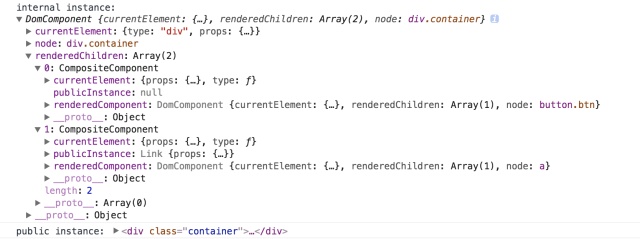
这里的 CompositeComponent 和 DOMComponent 区别于 Link 这种 Component,CompositeComponent 和 DOMComponent 是 React 内部实现的细节,不提供向外的 API,同理 CompositeComponent 和 Link 的 instance 也不同,为了进行区分,把 CompositeComponent/DOMComponent 的 instance 称为内部实例(internal instance)而把 Link 这类的实例称为外部实例(public instance),外部无法访问内部实例,但能通过 getPublicInstace 访问外部实例,也即组件实例,这里可以看出 DOMComponent 和 CompositeComponent 的外部实例返回类型不一致,DOMComponent 返回的是 node 节点而 CompositeComponent 返回的则是组件的实例,且对于 Function Component 其返回值为 null。其和 React 的 ref 回调返回的实例情况一致。

至此我们可以实现 React 的 render 功能了,其接受一个 element 和 mountNode 节点,将 element 描述的 dom 树渲染到 mountNode 中。

function render(element, mountNode){
var rootComponent = instantiateComponent(element); // top-level internal instance
var node = rootComponent.mount(); // top-level node
mountNode.appendChild(node);
var publicInstance = rootComponent.getPublicInstance(); // top-level public instance
console.log('internal instance:', rootComponent);
console.log('public instance:', publicInstance);
return publicInstance;
}
render(app, document.querySelector('#root'));

执行后的结果是

从 internal instance 信息可以看出,

  • public instance 就是 internal instance 的 node 属性值。
  • DOMComposite 的 node 为 public Instance 节点,Function Component 对应的 publicInstance 为 null,Class Component 对应的 publicInstance 是 Link 的实例,其完整的存储了上次渲染产生的结果,这样就可以为后续的更新操作提供便捷。

这里实现的 render 函数与 React 的 render 有重要差别,React 的 render 只有首次 render 时才会进行 mount 操作,后续 render 进行 update 操作,因此我们的 render 也要实现 update 功能。

Reconciliation#

更新实现是 React 的核心,React v15 之前使用 stack reconciliation 算法进行更新,v16 则使用了 [ fiber reconciliation ](https://link.zhihu.com/?target=https%3A//github.com/acdlite/react-fiber- architecture)

本章和下章主要讲解 stack reconciliation 的实现。

因为 update 操作涉及到旧组件实例的 unmount,所以先介绍 unmount 的实现。

unmount 的实现类似于 mount,先卸载子组件后卸载父组件。前面我们在 internal instance 上已经存储了组件的信息,只需后序遍历组件树进行卸载即可,同时执行 componentWillUnmount 的生命周期。

function unmountComponentAtNode(mountNode){
var node = mountNode.firstChild;
var rootComponent = node._internalInstance; // 读取 internal instance
rootComponent.unmount();
mountNode.innerHTML = '';
}

unmountComponentAtNode 需要读取_internalInstance 且对_internalInstance 进行 unmount 操作,这需要我们在 render 里对_internalInstance 进行存储和 Composite Component 及 Dom Component 对 unmount 操作进行支持。实现如下:

function render(element, mountNode){
if(mountNode.firstChild){ // 若组件已经mount,则卸载以前的组件
unmountComponentAtNode(mountNode);
}
var rootComponent = instantiateComponent(element); // top-level internal instance
var node = rootComponent.mount(); // top-level node
mountNode.appendChild(node);
node._internalInstance = rootComponent; // 存储internal instance供 unmount和update使用
var publicInstance = rootComponent.getPublicInstance(); // top-level public instance
return publicInstance;
}
class DomComponent {
unmount(){
this.renderedChildren.forEach(child => child.unmount()); //递归卸载children组件
}
}
class CompositeComponent {
unmount(){
hooks(this.publicInstance, 'componentWillUnmount'); //执行生命周期
this.renderedComponent.unmount(); // 递归执行renderedComponent
}
}

Update#

React 的更新基于两个关键点

  • 不同的组件类型认为会生成完全不同的组件树,React 不会尝试去比对他们,而是直接卸载上一个组件树,加载新的组件树。
  • 列表的对比是基于 key 值的,不同的 key 值表示不同的组件树,React 会通过替换、删除、增加、更新的方式将一个列表更新成新的列表。

为了支持更新操作我们扩充 internal instance,支持一个新的方法 receive(nextElement)以支持更新操作。

class CompositeComponent{
getHostNode() {
return this.renderedComponent.getHostNode();
}
receive(nextElement){
const prevProps = this.currentElement.props;
const publicInstance = this.publicInstance;
const prevRenderedComponent = this.renderedComponent;
const prevRenderedElement = prevRenderedComponent.currentElement;
this.currentElement = nextElement;
const type = nextElement.type;
const nextProps = nextElement.props;
let nextRenderedElement;
if(isClass(type)) {
hooks(publicInstance, 'componentWillUpdate', nextProps);
publicInstance.props = nextProps;
nextRenderedElement = publicInstance.render();
} else if(typeof type === 'function') {
nextRenderedElement = type(nextProps);
}
if(prevRenderedElement.type === nextRenderedElement.type) {
prevRenderedComponent.receive(nextRenderedElement);
hooks(publicInstance,'componentDidUpdate',prevProps);
return
}
const prevNode = prevRenderedComponent.getHostNode();
prevRenderedComponent.unmount();
const nextRenderedComponent = instantiateComponent(nextRenderedElement);
const nextNode = nextRenderedComponent.mount();
this.renderedComponent = nextRenderedComponent;
prevNode.parentNode.replaceChild(nextNode, prevNode);
}
}
function findDOMNode(instance){
return instance.getHostNode();
}

CompositeComponent 的 receive 实现如上所示,主要逻辑是

  • 判断组件类型是否相同,相同则执行更新操作(由于 CompositeComponent 并不负责创建 DOM 节点,所以与 mount 类似,将其 delegate to renderedComponent 执行,依次递归直到 DOMComposite 才负责执行真正的 DOM 更新。
  • 如果组件类型不同则卸载旧组件,加载新组件,同时替换旧组件渲染的 DOM 节点为新组件的 DOM 节点,因此我们需要获得旧组件的 DOM 节点,同理 delegate 到 DOM Composite,ReactDOM.findDOMNode(instance)的执行逻辑即如此
  • 执行 componentWillUpdate 和 componentDidUpdate 生命周期,Function Component 因为不存在 public instance 也就无法执行所有的生命周期。

我们发现 CompositeComponent 做的更新工作实际很少,实际的 DOM 更新都 delegate 给 DomComponent 了

class DomComponent{
getHostNode() {
return this.node;
}
updateDomProperties(prevProps, nextProps) {
const node = this.node;
// 删除旧的attribute
Object.keys(prevProps).forEach(propName => {
if(propName !== 'children' && !nextProps.hasOwnProperty(propName)) {
node.removeAttribute(propName);
}
})
// 更新新的attribute
Object.keys(nextProps).forEach(propName => {
if(propName !== 'children') {
node.setAttribute(propName, nextProps[propName])
}
})
}
updateChildren(prevProps, nextProps) {
// TODO 粗暴实现
const children = nextProps.children;
const node = this.node;
// 卸载所有旧的组件
this.renderedChildren.forEach(child => child.unmount())
this.node.innerHTML = '';
// 加载新的组件
const renderedChildren = children.map(instantiateComponent);
this.renderedChildren = renderedChildren;
const childNodes = renderedChildren.map(child => child.mount());
for(let child of childNodes) {
node.appendChild(child);
}
}
receive(nextElement) {
const node = this.node;
const preveElement = this.currentElement;
const prevProps = preveElement.props;
const nextProps = nextElement.props;
this.currentElement = nextElement;
this.updateDomProperties(prevProps, nextProps);
this.updateChildren(prevProps, nextProps);
}
}

DomComponent 的更新主要包含两部分 attribute 的更新和 children 的更新,attribute 的更新比较简单,删除不存在的 attribute 和替换新的 attribute,而 children 的更新则比较复杂,最为粗暴的实现是卸载所有旧的 children 组件,加载新的 children 组件。这样使得所有的 children 组件没有办法复用之前的 DOM 结构,浪费性能。

较为复杂的实现是依次比对新旧两个 list,类型相同的则进行更新,类型不同则进行替换。

列表比对的结果有四种,对应四种操作:

  • 旧列表不存在,新列表存在,对应新增(ADD)操作。

  • 旧列表存在,新列表不存在,对应删除(DELETE)操作。

  • 旧列表存在,新列表存在,但组件类型不同,对应替换(REPLACE)操作。

  • 旧列表存在,新列表存在,且组件类型相同,对应更新(UPDATE),更新原组件即可。

    updateChildren(prevProps, nextProps) { const prevChildren = prevProps.children; const nextChildren = nextProps.children; const prevRenderedChildren = this.renderedChildren; const nextRenderedChildren = []; const operationQueue = []; for(let i=0;i< nextChildren.length;i++){ const prevChild = prevRenderedChildren[i]; // insert if(!prevChild){ const nextChild = instantiateComponent(nextChildren[i]); const node = nextChild.mount(); operationQueue.push({ type: 'ADD', node }) nextRenderedChildren.push(nextChild); continue; } const canUpdate = prevChildren[i].type === nextChildren[i].type; // replace if(!canUpdate){ const prevNode = prevChild.getHostNode(); prevChild.unmount(); const nextChild = instantiateComponent(nextChildren[i]); const nextNode = nextChild.mount(); console.log('prevNode:', prevNode); console.log('nextNode:', nextNode); operationQueue.push({ type: 'REPLACE', prevNode, nextNode }); nextRenderedChildren.push(nextChild); continue; } prevChild.receive(nextChildren[i]); nextRenderedChildren.push(prevChild); } // delete for(let j=nextChildren.length;j<prevChildren.length;j++){ const prevChild = prevRenderedChildren[j]; const node = prevChild.node; prevChild.unmount(); operationQueue.push({ type: 'REMOVE', node }) } this.renderedChildren = nextRenderedChildren;

    // batch update DOM
    while(operationQueue.length > 0){
    const operation = operationQueue.shift();
    switch(operation.type){
    case 'ADD':
    this.node.appendChild(operation.node);
    break;
    case 'REPLACE':
    this.node.replaceChild(operation.nextNode, operation.prevNode);
    break;
    case 'REMOVE':
    this.node.removeChild(operation.node);
    break;
    }
    }

    }

至此我们已经实现了组件的更新操作,但其仍然存在很大的缺陷。

其对于列表的追加和尾部删除,效率很高如[

,
,
] => [
,
] 或者[
,
] => [
,
,
]只需增加或删除尾部的
即可,但对于头部的插入或者删除效率很差,需要替换所有的组件,所有的 DOM 都无法复用。

为此需要一种更高效的算法来尽可能的复用原有的组件,React 通过 key 唯一的标记组件来实现原有组件尽可能的复用。

至此所有代码如下

class Component {
render() {
throw new Error('must implement render method');
}
}
Component.prototype.isReactComponent = true;
function isClass(type) {
return (
Boolean(type.prototype) &&
Boolean(type.prototype.isReactComponent)
);
}
function createElement(type, props, ...args) {
props = Object.assign({}, props);
let children = [].concat(...args);
props.children = children;
return { type, props };
}
function hooks(obj, name, ...args) {
obj && obj[name] && obj[name].apply(obj, args);
}
class DomComponent {
constructor(element) {
this.currentElement = element;
this.renderedChildren = [];
this.node = null;
}
getPublicInstance() {
return this.node;
}
getHostNode() {
return this.node;
}
unmount() {
this.renderedChildren.forEach(child => child.unmount());
}
updateDomProperties(prevProps, nextProps) {
const node = this.node;
// 删除旧的attribute
Object.keys(prevProps).forEach(propName => {
if(propName !== 'children' && !nextProps.hasOwnProperty(propName)) {
node.removeAttribute(propName);
}
})
// 更新新的attribute
Object.keys(nextProps).forEach(propName => {
if(propName !== 'children') {
node.setAttribute(propName, nextProps[propName])
}
})
}
updateChildren(prevProps, nextProps) {
const prevChildren = prevProps.children;
const nextChildren = nextProps.children;
const prevRenderedChildren = this.renderedChildren;
const nextRenderedChildren = [];
const operationQueue = [];
for(let i=0;i< nextChildren.length;i++){
const prevChild = prevRenderedChildren[i];
// insert
if(!prevChild){
const nextChild = instantiateComponent(nextChildren[i]);
const node = nextChild.mount();
operationQueue.push({
type: 'ADD',
node
})
nextRenderedChildren.push(nextChild);
continue;
}
const canUpdate = prevChildren[i].type === nextChildren[i].type;
// replace
if(!canUpdate){
const prevNode = prevChild.getHostNode();
prevChild.unmount();
const nextChild = instantiateComponent(nextChildren[i]);
const nextNode = nextChild.mount();
console.log('prevNode:', prevNode);
console.log('nextNode:', nextNode);
operationQueue.push({
type: 'REPLACE',
prevNode,
nextNode
});
nextRenderedChildren.push(nextChild);
continue;
}
prevChild.receive(nextChildren[i]);
nextRenderedChildren.push(prevChild);
}
// delete
for(let j=nextChildren.length;j<prevChildren.length;j++){
const prevChild = prevRenderedChildren[j];
const node = prevChild.node;
prevChild.unmount();
operationQueue.push({
type: 'REMOVE', node
})
}
this.renderedChildren = nextRenderedChildren;
// batch update DOM
while(operationQueue.length > 0){
const operation = operationQueue.shift();
switch(operation.type){
case 'ADD':
this.node.appendChild(operation.node);
break;
case 'REPLACE':
this.node.replaceChild(operation.nextNode, operation.prevNode);
break;
case 'REMOVE':
this.node.removeChild(operation.node);
break;
}
}
}
receive(nextElement) {
const node = this.node;
const preveElement = this.currentElement;
const prevProps = preveElement.props;
const nextProps = nextElement.props;
this.currentElement = nextElement;
this.updateDomProperties(prevProps, nextProps);
this.updateChildren(prevProps, nextProps);
}
mount() {
const { type, props } = this.currentElement;
let children = props.children;
children = children.filter(Boolean);
const node = document.createElement(type);
Object.keys(props).forEach(propName => {
if(propName !== 'children') {
node.setAttribute(propName, props[propName])
}
})
const renderedChildren = children.map(instantiateComponent);
this.renderedChildren = renderedChildren;
const childNodes = renderedChildren.map(child => child.mount());
for(let child of childNodes) {
node.appendChild(child);
}
this.node = node;
return node;
}
}
class TextComponent {
constructor(element) {
this.currentElement = element;
this.node = null;
}
getPublicInstance() {
return this.node;
}
getHostNode() {
return this.node;
}
receive(element){
this.currentElement = element;
this.node.textContent = element;
}
unmount() {
this.node = null;
}
mount() {
const node = document.createTextNode(this.currentElement);
this.node = node;
return node;
}
}
class CompositeComponent {
constructor(element) {
this.currentElement = element;
this.publicInstance = null;
this.renderedComponent = null;
}
getPublicInstance() {
return this.publicInstance;
}
getHostNode() {
return this.renderedComponent.getHostNode();
}
receive(nextElement) {
const prevProps = this.currentElement.props;
const publicInstance = this.publicInstance;
const prevRenderedComponent = this.renderedComponent;
const prevRenderedElement = prevRenderedComponent.currentElement;
this.currentElement = nextElement;
const type = nextElement.type;
const nextProps = nextElement.props;
let nextRenderedElement;
if(isClass(type)) {
hooks(publicInstance, 'componentWillUpdate', nextProps);
publicInstance.props = nextProps;
nextRenderedElement = publicInstance.render();
} else if(typeof type === 'function') {
nextRenderedElement = type(nextProps);
}
if(prevRenderedElement.type === nextRenderedElement.type) {
prevRenderedComponent.receive(nextRenderedElement);
hooks(publicInstance,'componentDidUpdate',prevProps);
return
}
const prevNode = prevRenderedComponent.getHostNode();
prevRenderedComponent.unmount();
const nextRenderedComponent = instantiateComponent(nextRenderedElement);
const nextNode = nextRenderedComponent.mount();
this.renderedComponent = nextRenderedComponent;
prevNode.parentNode.replaceChild(nextNode, prevNode);
}
unmount() {
hooks(this.publicInstance, 'componentWillUnmount');
this.renderedComponent.unmount();
}
mount() {
const { type, props } = this.currentElement;
const children = props.children;
let instance, renderedElement;
// delegate to mount
if(isClass(type)) {
instance = new type(props);
instance.props = props;
hooks(instance, 'componentWillMount');
renderedElement = instance.render();
this.publicInstance = instance;
} else {
renderedElement = type(props);
}
const renderedComponent = instantiateComponent(renderedElement);
this.renderedComponent = renderedComponent;
return renderedComponent.mount();
}
}
function instantiateComponent(element) {
if(typeof element === 'string') return new TextComponent(element);
if(typeof element.type === 'string') return new DomComponent(element);
if(typeof element.type === 'function') return new CompositeComponent(element);
throw new Error('wrong element type');
}
function mount(element) {
const rootComponent = instantiateComponent(element);
return rootComponent.mount();
}
function findDOMNode(instance){
return instance.getHostNode();
}
function render(element, mountNode) {
if(mountNode.firstChild) {
const prevNode = mountNode.firstChild;
const prevComponent = prevNode._internalInstance;
const prevElement = prevComponent.currentElement;
if(prevElement.type === element.type) {
prevComponent.receive(element);
return;
}
unmountComponentAtNode(mountNode);
}
var rootComponent = instantiateComponent(element); // top-level internal instance
var node = rootComponent.mount(); // top-level node
mountNode.appendChild(node);
node._internalInstance = rootComponent;
var publicInstance = rootComponent.getPublicInstance(); // top-level public instance
return publicInstance;
}
function unmountComponentAtNode(mountNode) {
var node = mountNode.firstChild;
var rootComponent = node._internalInstance; // 读取 internal instance
rootComponent.unmount();
mountNode.innerHTML = '';
}
const React = {
render,
unmountComponentAtNode
}
// test example
class Link extends Component {
componentWillMount() {
console.log('Link will Mount');
}
componentWillUnmount() {
console.log('Link will Unmount');
}
componentWillUpdate() {
console.log('Link will update')
}
componentDidUpdate() {
console.log('Link Did update')
}
render() {
const { children } = this.props
return (
<a href="http://www.baidu.com">{children}</a>
)
}
}
function Button(props) {
return (
<button class="btn">{props.text}</button>
)
}
class App extends Component {
componentWillMount() {
console.log('App will Mount');
}
componentWillUnmount() {
console.log('App will Unmount');
}
componentWillUpdate() {
console.log('App will update')
}
componentDidUpdate() {
console.log('App Did update')
}
render() {
const { content } = this.props;
if(content === 'toutiao'){
return (
<div class="container">
<Link> { content}</Link>
</div>
)
}
return (
<div class="container">
<Button text="this is a button" />
<Link>{content}</Link>
</div>
)
}
}
const mountNode = document.querySelector('#root');
React.render(<App content="baidu"/>, mountNode);
setTimeout(() => {
React.render(<App content="toutiao"/>, mountNode);
}, 1000)